Willow
- 3.5
- Rating
- 50.00K
- Installs
- Free
- Price

 Analysis by App-foxy
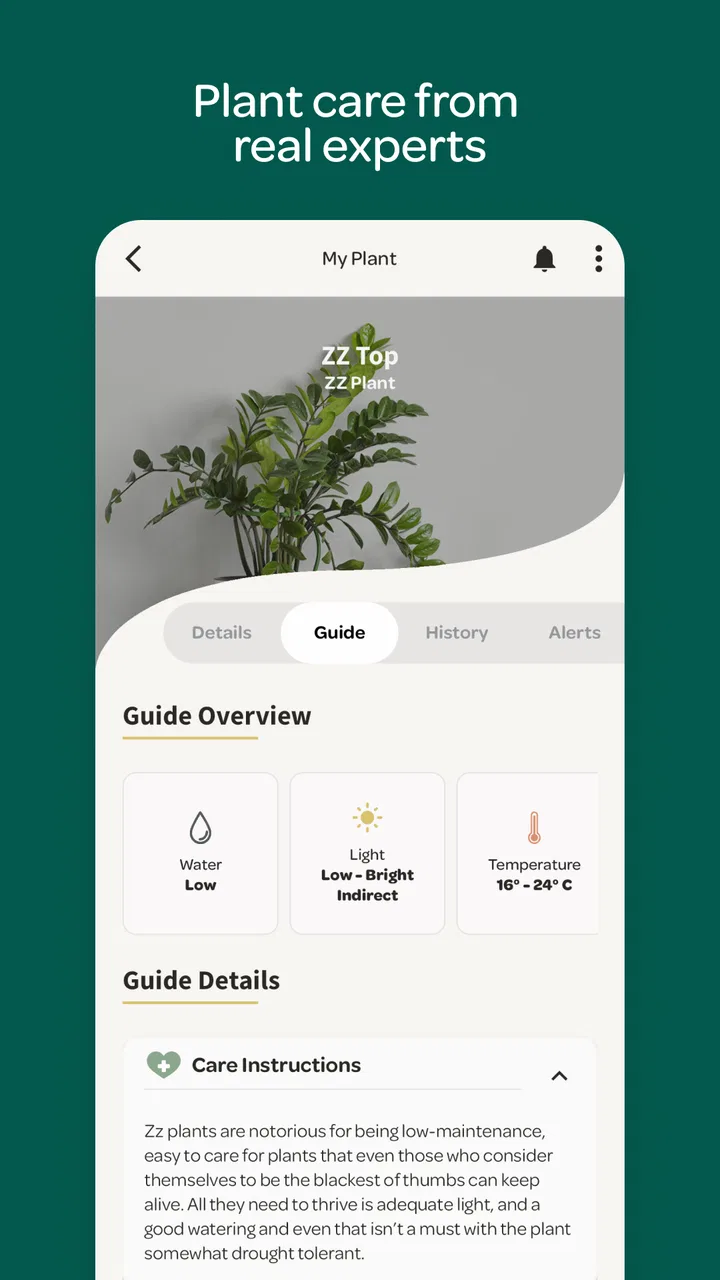
Keeping houseplants alive often sounds easier than it feels. The difficult part is rarely remembering that plants need care; it is knowing what kind of care is appropriate today. A dry-looking surface may not mean the roots need water, while a plant placed in a bright room may still be receiving the wrong kind of light. Willow, from Plant with Willow, is designed around reducing that uncertainty, and after spending time with it, I found its most useful quality is not that it turns plant care into a game or a social network. It gives beginners a calmer way to decide what to do next.
This is a free House & Home app for Android, with optional in-app purchases ranging from $3.49 to $26.99 per item. It is rated for Everyone, so its tone and purpose are accessible to a broad audience. The app has passed 50 thousand installs and holds an average rating of 3.5 from around 200 ratings, which suggests a mixed but meaningful reception rather than universal approval. I would describe it as a practical companion for people who want guidance without building a complicated spreadsheet of watering dates.
Willow’s central idea: replace guesswork with a care routine
The capability that matters most here is the attempt to make plant care feel more decision-based than calendar-based. Many ordinary reminders tell me to water every few days, but a fixed interval can be misleading. A plant in a warm, bright room may dry differently from the same plant in a cooler corner. Willow’s appeal is that it aims to help me approach care as an ongoing process instead of blindly following a repeating alarm.
You May Also Like

 Blood Strike: 2.5 Anniversary
Blood Strike’s Loadouts Turn Every Drop Into a Tactical Gamble
A close look at Blood Strike’s custom loadouts: how fast access to signature weapons reshapes its battle royale rhythm, rewards preparation, and narrows the gap between fights.

 Pandora - Music & Podcasts
Pandora’s Music Is Easy to Start, but Harder to Recover
Pandora’s strength is its low-effort path from a seed to a station. Its weak spot is how much confidence it asks you to place in connection, setup, and quiet recovery.

 8 Ball Pool
 Is Built on Rivalries, Rematches, and Routine
A close look at the rivalries, rematches, shared routines, and unanswered safety questions that turn a quick pool match into a persistent mobile community.

 Samsung Music
’s Quiet Strength Is Playing What You Already Own
Its reach comes less from spectacle than from dependable access to a personal library. That simplicity is both the app’s strongest retention engine and its ceiling.

 AccuWeather: Weather Radar
AccuWeather Review: A Quick, Clear Forecast for Everyday Decisions
For everyday plans, the best forecast is the one you can understand quickly. AccuWeather makes rain timing, radar, and local conditions easy to act on, with a few trade-offs.

 Hill Climb Racing
Why Hill Climb Racing Still Turns Crashes Into One More Run
A tiny car, a bumpy hill and one more upgrade: Hill Climb Racing keeps resurfacing because its simple chaos makes every near-miss feel personal.
More From Our News Desk
View All News


That distinction is important for new plant owners. A reminder can create confidence without creating understanding. If I water simply because a notification appears, I can still overwater a plant whose soil is already damp. A more thoughtful care assistant should encourage me to look at the plant, its growing conditions, and the timing of the last task before reaching for the watering can. That is the role I see Willow trying to fill.
I would not treat it as a replacement for learning the basic signs of plant stress. Leaves, soil, pot drainage, room temperature, and seasonal changes still matter. Instead, I use the app as a prompt to observe those details consistently. That is where it has more value than a generic phone reminder: it keeps the plant itself at the center of the decision.
Why this approach feels different from a normal reminder
A normal reminder is binary: complete the task or dismiss it. Houseplant care is not always binary. Sometimes the plant needs a check rather than water. Sometimes the soil is still moist, but the leaves suggest that the plant needs a better position or closer inspection. Willow’s usefulness comes from encouraging a pause before I act.
That small pause can prevent one of the most common beginner mistakes: treating every drooping leaf as proof of thirst. In practice, I find it helpful to open the app before watering, inspect the pot, and then decide whether the suggested task makes sense for that particular plant. The app becomes a checklist for observation rather than an authority that I follow without thinking.
The best result is not more notifications; it is better timing. When the app helps me notice patterns, I can gradually learn which plants dry quickly and which ones prefer a longer interval. That learning effect is more valuable than any single reminder because it makes future decisions less dependent on the phone.
Using it in a real home routine
Imagine a weekday morning before work. I notice that one plant near the window looks slightly tired, while another across the room appears unchanged. With a basic reminder app, both might receive the same instruction. With Willow, I have a reason to check them individually instead of treating the collection as one group. I can inspect the soil, consider the position of each pot, and use the care prompt to decide what deserves attention.
That workflow is especially useful when several plants have been acquired at different times. New owners often remember buying a plant but forget what care pattern they intended to follow. A dedicated plant-care app gives those plants a place in one routine. I can check the collection during a weekly reset, then make smaller adjustments when a particular plant behaves differently.
One practical habit is to avoid completing a task immediately just to clear it from view. I prefer to use the prompt as a trigger for a physical check, then complete the task only after I have acted. This prevents the app from becoming a record of intentions rather than a record of care. It also makes the history more meaningful if I later wonder why a plant improved or declined.
Another useful habit is to review the routine after moving a plant. A change from a shaded shelf to a sunny window can alter how quickly the soil dries. Even without treating the app’s guidance as exact science, a change in placement should make me more cautious about copying the old pattern. Willow works best when I treat changes in the home as changes in the care situation.
The strongest scenario: a growing collection owned by a beginner
The people I can most easily recommend Willow to are new plant owners who have moved beyond one or two pots but have not yet developed their own system. With a single plant, remembering care may be simple. With several plants, memory becomes unreliable, especially when the plants occupy different rooms and have different needs.
For that user, the app can act as a central place to build a habit. The benefit is not just remembering a task; it is reducing the mental load of asking, “Which plant did I check last?” A short review of the app can turn plant care into a manageable routine rather than a vague worry that something has been forgotten.
I also see value for someone returning to plants after a failed attempt. Overwatering, inconsistent attention, and poor placement can all be discouraging. Willow cannot guarantee that every plant will recover or thrive, but it can make the next attempt more deliberate. The user can slow down, inspect before watering, and establish a repeatable process instead of reacting to every visual change.
It is less compelling for an experienced indoor gardener who already keeps detailed notes and understands the needs of each species. That person may find a separate journal, a spreadsheet, or a simple calendar more flexible. Willow’s strength is reducing complexity for ordinary home use, not replacing a specialist’s carefully customized system.
What the app changes in everyday decision-making
The subtle advantage is that it can shift the question from “What should I do today?” to “What does this plant need after I check it?” That sounds like a small change, but it affects how I respond to uncertainty. Instead of watering because I feel guilty about neglecting the plant, I have a prompt to look for evidence first.
This is also where the app can help with travel or busy periods, although I would not rely on a digital schedule alone when plants are left unattended for a long time. Before leaving, I can use the routine to identify which plants need a closer inspection and which ones should not receive extra water simply because I will be away. The trade-off is that responsible care still requires judgment and, for longer absences, a person who can physically check the plants.
A second non-obvious use is troubleshooting after a mistake. If I have watered too frequently, the useful response is not to compensate with another automatic action. I can pause, observe the soil and leaves, and use the app as a reminder to monitor rather than intervene. This makes it more useful as a behavior-shaping tool than as a strict instruction engine.
Where the experience can become frustrating
Willow’s central promise also creates its main limitation: no app can fully understand a plant’s condition through a routine alone. Indoor environments change, pots drain differently, and two plants that look similar may respond differently. If I expect perfect diagnoses or exact watering decisions, I am likely to be disappointed.
The average rating of 3.5 reflects that this is not an effortless solution for everyone. Some users may want a more immediate, highly specific answer, while others may prefer a bare reminder with no additional structure. The app sits between those approaches. It asks me to participate in the care process, which is helpful when I want guidance but less convenient when I only want to tap a notification and move on.
The free entry point is welcome, but optional purchases between $3.49 and $26.99 per item mean that the full experience may not feel identical for every user. I would begin with the free version and test whether its routine fits my collection before paying for anything. That is particularly sensible for someone with only one plant, since a simple recurring reminder may already cover the basic need.
There is also a risk of over-organizing a relaxing hobby. If I spend more time maintaining the care system than looking at the plants, the tool has become counterproductive. Willow works best when it stays in the background: a prompt that supports observation, not another daily obligation demanding constant attention.
How it compares with the usual alternatives
The simplest alternative is the built-in calendar or reminder app on a phone. That option is cheaper in effort and often enough for a single plant with a stable routine. Its weakness is that it treats care as a date on a schedule. Willow is better suited to someone who wants plant care to have its own context rather than being mixed with appointments, shopping lists, and work alerts.
A notebook offers another strong alternative. Writing down watering and observations can be more flexible than any app, especially for people who enjoy tracking leaf growth, repotting, or changes in light. A notebook also avoids the temptation to assume that a notification is always correct. However, it requires consistent handwriting and is easier to misplace. Willow has the advantage when I want a dedicated digital routine that is available with the rest of my phone habits.
Online plant guides are better when I need species-specific background, such as learning why a particular plant dislikes wet soil or how to respond to pests. Willow is more useful for turning general knowledge into repeated household action. I would use a guide for education, then use the app to help me remember to observe and follow through.
That division of labor matters. I would not install Willow expecting a complete botany course. I would install it because I want a practical layer between reading advice and actually remembering to check my plants.
Who should install it, and who should skip it
I think Willow is a good match for beginners, busy apartment dwellers, and anyone whose plant collection has become just large enough to create confusion. It is also useful for people who tend to overwater because they want to be helpful. The app’s greatest contribution is encouraging a more measured response before care becomes excessive.
It may also suit households where more than one person looks after the plants. A shared routine can reduce the classic problem of two people watering the same pot because neither knows whether the other already did it. The app cannot replace communication, but a dedicated care record gives the household a clearer starting point.
I would skip it if I only own one hardy plant and already remember its routine, or if I strongly prefer paper notes. I would also look elsewhere if I need detailed diagnostic tools, advanced collection management, or highly specialized advice for rare plants. Willow’s accessible approach is a strength for everyday care, but that same simplicity may feel limiting to collectors who want deep customization.
For iPhone and Android users, the decision should come down less to the platform and more to the desired level of involvement. If I want a gentle structure that helps me observe before acting, it makes sense. If I want a completely automatic answer with no personal judgment, it is the wrong expectation.
My final view after using it as a care companion
Plant with Willow has created an app around a sensible problem: people do not usually fail with houseplants because they lack good intentions. They fail because care is easy to forget, easy to overdo, and difficult to judge from a distance. Willow addresses that problem by giving the routine a dedicated home and encouraging a check before an action.
Its current version, 3.6.1, makes it a straightforward option to try without an upfront payment. I would start slowly, add only the plants I genuinely want to monitor, and use each prompt as an invitation to inspect rather than an order to water. That approach gives the app its best chance to help while protecting me from its biggest weakness: treating a general routine as a perfect diagnosis.
My recommendation is positive but specific. Choose Willow if you want help building reliable plant-care habits and you appreciate a little guidance around everyday decisions. Choose a basic reminder, notebook, or specialist reference instead if your needs are simpler or more advanced. For the middle ground—several ordinary houseplants, an inconsistent memory, and a desire to make fewer avoidable mistakes—Willow is a useful, low-pressure companion that makes care feel more manageable without pretending that the phone can replace paying attention to the plant.
FAQs for Willow
01What is Willow and what can I use it for?
Willow is an app designed to help users connect, communicate, and discover content or services through a simple mobile experience. Its exact tools may vary depending on the version and platform, so it is worth checking the current app description before downloading. After installation, review the available sections, account options, and settings to understand which features are most useful for you.
02Is Willow free to download and use?
Willow can generally be downloaded without an upfront charge, but some features may require in-app purchases, a subscription, or other optional payments. Before creating an account or starting a trial, check the pricing page carefully for renewal terms, billing frequency, and cancellation instructions. Availability of paid features may also differ between Android and iOS versions or by region.
03Does Willow require an account or personal information?
Depending on which functions you want to use, Willow may ask you to register with an email address, phone number, or another supported sign-in method. Additional profile information could be requested to personalize the experience or enable communication features. Before submitting details, read the privacy policy and review the permissions requested, especially access to contacts, location, photos, notifications, or microphone.
04Is Willow safe and suitable for all users?
Willow’s suitability depends on its specific features, community content, and the age rating shown in your app store. If the app includes messaging, profiles, or user-generated content, use the available blocking and reporting tools and avoid sharing sensitive information with strangers. Parents should check the rating, privacy controls, and supervision options before allowing younger users to install it.
05What should I check before downloading Willow?
Before downloading Willow, confirm that your Android or iPhone meets the required operating-system version and that you have enough free storage. Also check recent user reviews, developer information, update history, subscription details, and the permissions requested during installation. A stable internet connection may be necessary for the main features, while performance can vary depending on your device and location.
Pros
- Simple interface makes core features easy to find.
- Useful reminders help users stay consistent with routines.
- Personalized settings make the experience more flexible.
- Content loads quickly on most modern devices.
- Regular updates can improve stability and add useful features.
Cons
- Some features may require a paid subscription.
- Customization options can feel limited for advanced users.
- The app may use noticeable battery during frequent background activity.
- Certain tools depend on a stable internet connection.
- Support and help resources may not cover every issue.

Willow
Gallery